The five-minute version, up front
A daily stocktake that actually takes five minutes only counts the handful of lines that move fast enough to run out between deliveries — not your whole store. Everything else can wait for a weekly count.
Most stores that say "we tried daily stocktakes and it didn't work" tried to count everything, every day. That's not a five-minute job, it's a ninety-minute job, and it gets skipped the first time the shop gets busy — which is exactly the day you needed it most.
The fix isn't more discipline. It's a smaller, sharper list.
Step 1: Build your "fast-mover" list once, properly
Sit down (once, not every day) and identify the 15 to 25 lines in your store or kitchen that genuinely move fast enough to sell out between deliveries. For a deli counter, that's your top-selling meats, cheeses, and prepared salads. For a café kitchen, it's your milk, your bread, your signature protein of the day. For a small supermarket, it's fresh produce and anything perishable with a short shelf life.
Everything else — canned goods, cleaning supplies, packaging — doesn't need daily eyes on it. A weekly or fortnightly count is plenty, because those lines simply can't run out overnight the way fresh stock can.
Step 2: Walk the same physical route every time
Randomly wandering the stockroom wastes minutes you don't have. Set a fixed walking order — cold room first, then dry store, then front-of-house display — and always count in that order. Muscle memory does half the work after a week of repetition; you stop having to think about where to go next.
Step 3: Count what's actually left, not what you think should be left
This sounds obvious, but it's the single most common shortcut that quietly breaks a stocktake: eyeballing a shelf and guessing "yeah, about six" instead of actually counting. Six units of a $4 item barely matters. Six kilos of eye fillet does. Take the extra ten seconds on anything expensive or fast-moving.
For anything sold by weight — mince, sliced meats, deli cheese — count the actual decimal amount, not a rounded whole number. A tray reading 2.3kg isn't "2" or "3," and rounding it either way compounds into a genuinely wrong order suggestion by the end of the week.
Step 4: Write the number down where the order gets built from it
This is where most paper systems quietly fall apart: the count happens on a clipboard, and the order gets built later from memory, or from a different, half-updated spreadsheet. Every gap between "where you counted" and "where you order from" is a place for the number to get lost or fat-fingered.
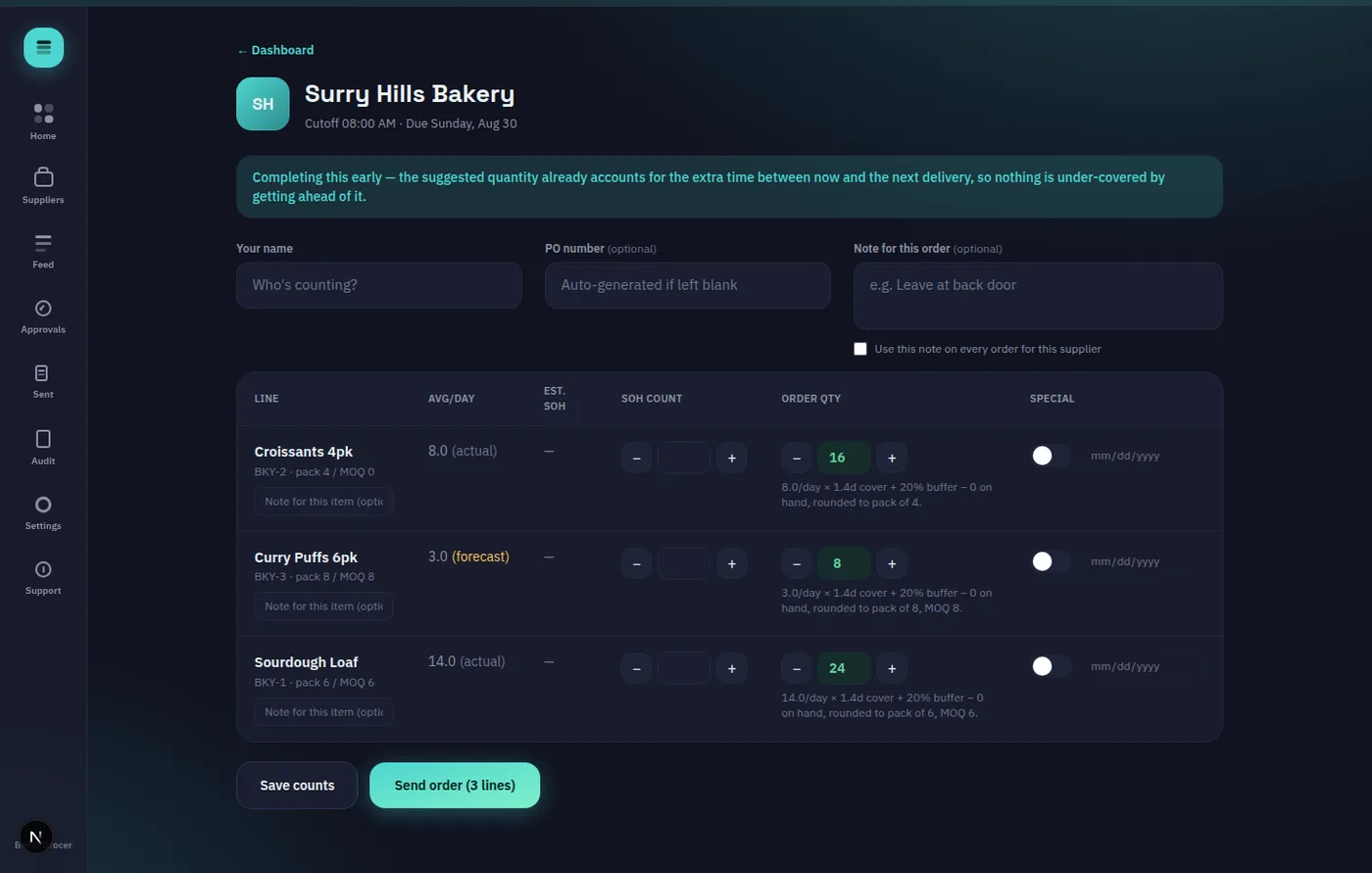
The tighter this loop, the more the five-minute count actually holds up. On OnHand's own walk screen, the count and the resulting suggested order quantity sit on the same line, updating live as you type — no separate step to reconcile a clipboard against a spreadsheet later in the day when you've half-forgotten what you counted.
A quick note on suggested quantities
Whatever tool does the maths for you — a spreadsheet formula or software — it should be doing something simple and checkable: your average daily sales, times how many days until the next delivery actually lands, plus a small safety buffer, rounded to a sensible pack size. It shouldn't ever be a black box you can't sanity-check on the spot. If a suggested number looks wrong, you should be able to look at the inputs and see exactly why, and override it before anything gets sent — the count is a starting point for a decision, not the decision itself.
Step 5: Note anything unusual right there, not from memory later
If a tray looks close to its use-by, or a delivery needs checking before you accept it next time, jot that against the line item on the spot. A note like "check use-by before accepting" attached directly to that product, at the moment you noticed it, beats trying to remember it three hours later when the delivery actually arrives.
Why five minutes is the real target, not an aspiration
The whole point of a daily count is that it's small enough to survive a bad day. If it takes ninety minutes, it gets skipped on the one day the shop's slammed — which, statistically, is also the day you're most likely to run short on something. A five-minute count that happens every single day beats a ninety-minute count that happens twice a month.
If you're currently running this off paper and want to see what a live, always-updating version looks like, OnHand's live demo lets you walk through a real count with no signup needed. And if delegating this daily walk to floor staff is your actual sticking point rather than the counting itself, our knowledge base has a walkthrough of the whole ordering flow from count to send.
Five minutes a day, on the right lines, beats a full stocktake nobody has time to finish.