There's no single "best" stock ordering tool for independent supermarkets — the right pick depends on supplier count, team size, and how much you're willing to spend on setup versus ongoing subscription. Below are five real categories of tools in use today, evaluated on the same criteria, with an honest read on who each one actually suits.
The criteria that matter
Before comparing tools, it's worth being explicit about what "good" means for a small independent grocer specifically — not a 200-store chain, and not a single café:
- Supplier count fit — does the tool scale down cleanly to 2-10 suppliers, or is it built assuming dozens?
- Cutoff/schedule handling — does it track supplier-specific order days and lead times, including non-weekly schedules?
- Order math — is the suggested quantity a real, explainable calculation, or a black box?
- Approval control — can a manager sign off on bigger orders without slowing down routine ones?
- Cost at your actual scale — not list price, but price per supplier you'd realistically use.
1. Spreadsheets
Best for: a single owner-operator with one or two suppliers and loose deadlines.
Free, flexible, and something almost every store already has running. The tradeoff is that all the scheduling and math logic is manually built and manually maintained — see our full breakdown of where spreadsheets hold up and where they don't for the specifics. Fine at small scale, fragile past it.
2. POS-integrated ordering modules
Best for: stores that want ordering baked into their existing checkout system with no new login.
Most point-of-sale platforms bolt on a basic reorder or purchase-order feature. The convenience is real — one system, one bill. The limitation is also real: POS ordering modules are usually a secondary feature next to the vendor's actual product (sales and payments), so depth is often shallow — no per-supplier cutoff logic, limited or no approval workflow, and quantity suggestions that are often just "reorder to a fixed par level" rather than anything sensitive to real sales velocity.
3. Wholesale marketplace-style platforms
Best for: stores sourcing from a large number of wholesalers and wanting a single marketplace to browse and order from.
Platforms built around a broad supplier marketplace (Ordermentum-style ordering networks are one well-known shape of this category) genuinely shine when you're managing dozens of supplier relationships and want product discovery baked in, not just replenishment of suppliers you already have. The tradeoff: this scale of platform typically requires a sales conversation to get pricing, and it's arguably more platform than a 3-5-supplier independent grocer needs. If you're not actively discovering new wholesalers through the platform, you may be paying for a feature you don't use.
4. Heavyweight ERP systems
Best for: larger, multi-department operations where inventory, finance, HR, and ordering genuinely need to sit in one system.
ERP platforms are comprehensive by design, which is exactly the problem for a single-site independent supermarket — the implementation timeline, training overhead, and per-seat cost are built for organizations with dedicated IT and ops staff. We cover this specific mismatch in more depth in our look at why heavyweight ERP tends to fail smaller operations.
5. Dedicated stock ordering apps
Best for: independent stores with a handful of suppliers who want the scheduling, math, and approval logic built in — without ERP-scale overhead.
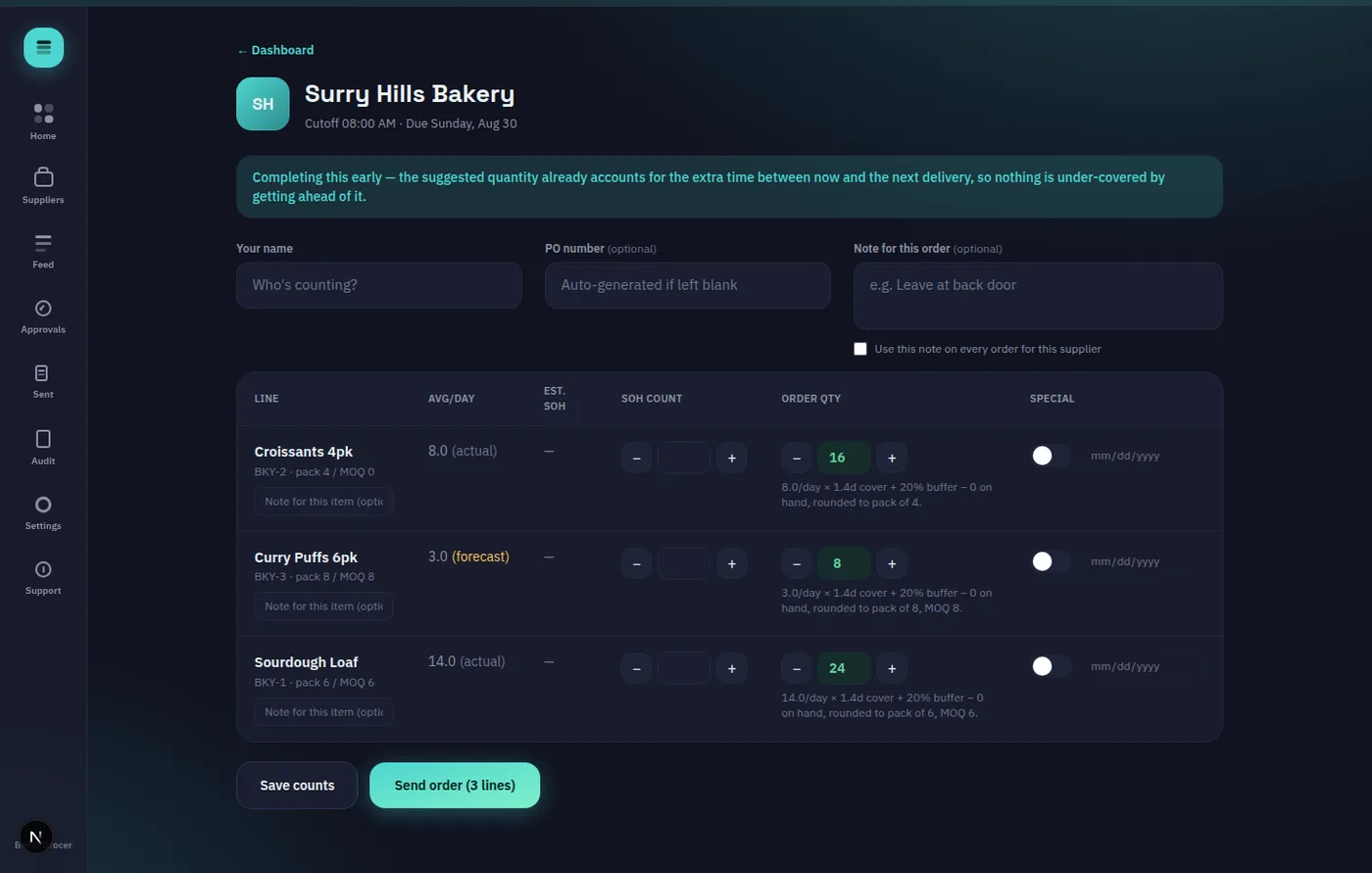
This is the category built specifically for the store size everything else on this list is a compromise for. OnHand is one example: a mobile-first stocktake ("walk") screen where a team member counts stock, the app computes a suggested order quantity deterministically (no AI guesswork — plain arithmetic based on average sales, cover days, and pack sizes), and the order goes out only after a human reviews or overrides the number. Per-supplier cutoff times and order days (including fortnightly and monthly schedules, not just weekly) are tracked automatically, and an optional manager-PIN approval can be switched on for specific suppliers — the expensive meat order, say — while routine ones flow through untouched.
Honest tradeoffs of dedicated ordering apps
To be fair to the other four categories: a dedicated ordering app doesn't handle sales/payments (that's still your POS), doesn't do product discovery across a wholesale marketplace, and doesn't manage finance or HR the way an ERP does. It's a narrow tool that does one job — the ordering cycle — deeply. If ordering is a minor part of your operational headache compared to staffing or accounting, a narrower tool may not move the needle much for you.
Comparing them side by side
| Tool | Supplier scale | Setup effort | Ordering math | Approval workflow | |---|---|---|---|---| | Spreadsheet | 1-3 | None | Manual formulas | None | | POS module | Varies | Low | Usually basic par-level | Rare | | Marketplace platform | 10+ | Sales-led | Varies | Varies | | ERP | Any, but overkill below mid-size | High | Configurable, complex | Yes, often heavy | | Dedicated ordering app | 1-15 typical | Low | Deterministic, explainable | Optional, per-supplier |
How to pick
Match the tool to your actual supplier count and team size first, price second. A store with two suppliers doesn't need marketplace scale; a store juggling twelve does. If you fall in the "handful of suppliers, want it done properly without ERP overhead" bracket, it's worth spending ten minutes in a no-cost, no-signup demo to see whether the deterministic-math, review-before-send model actually fits how your team already works, before committing to anything.