A lightweight inventory alternative is one built around a single store's or small chain's actual workflow — supplier-by-supplier stock ordering — rather than the general-purpose warehouse and multi-location inventory management that traditional inventory software is usually designed around. The difference isn't just fewer buttons; it's a fundamentally simpler mental model of what "inventory" means.
Traditional inventory software (the kind sold into distribution centers, manufacturers, and large multi-location retailers) tends to model inventory as a general ledger of SKUs across locations, with configurable fields for nearly anything you might want to track. That flexibility is the point for its intended buyer — and the source of the overhead for everyone else.
What "lightweight" actually means, concretely
It's worth being specific rather than using "lightweight" as a vague marketing adjective. In practice, a genuinely lightweight ordering tool differs from traditional inventory software in a few concrete ways:
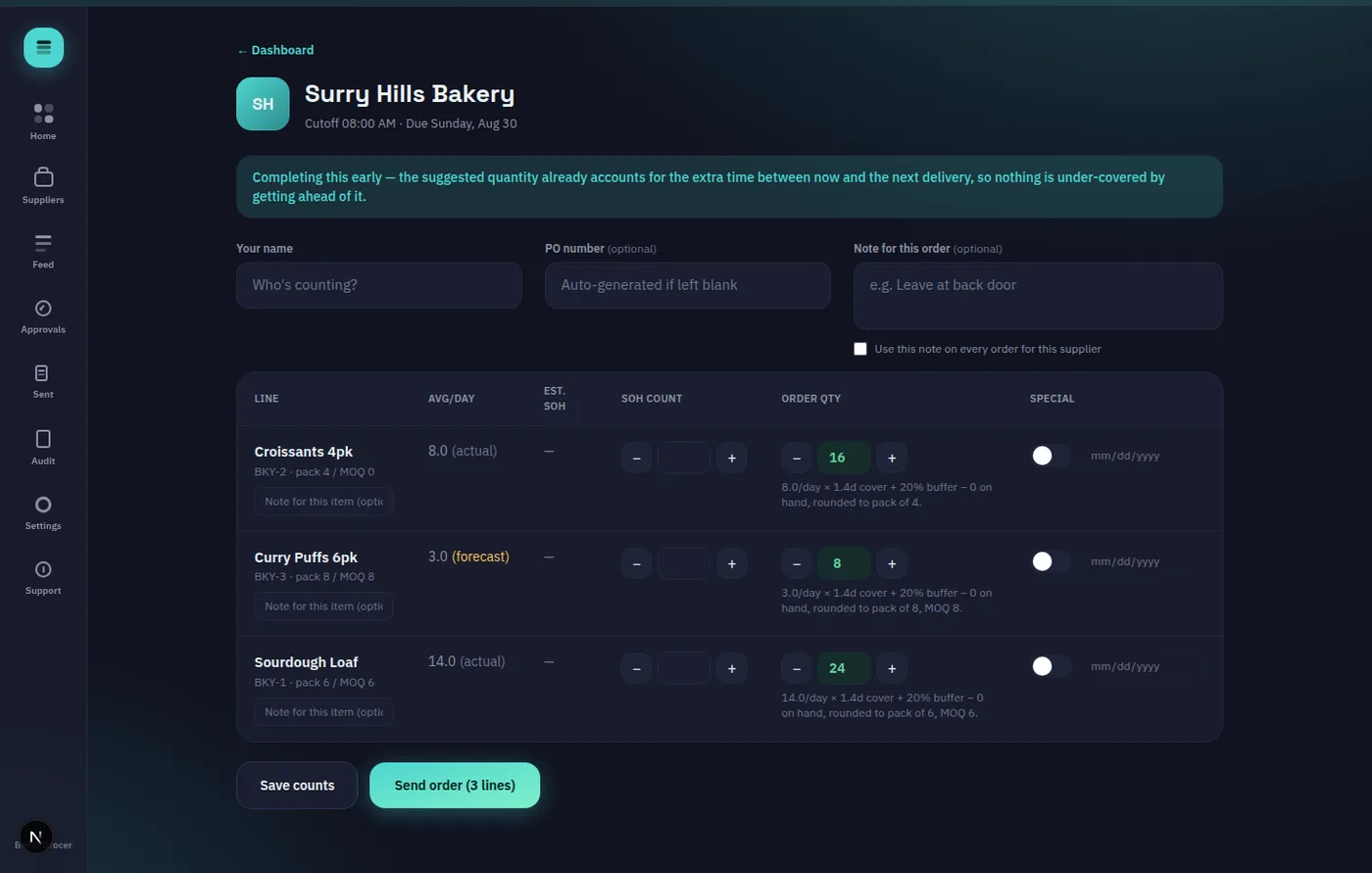
1. The workflow is the ordering cycle, not general SKU management. Traditional inventory software asks you to model your entire inventory as a database first, then build workflows on top of it. A lightweight ordering tool starts from the actual job — walk the store, count stock, get a suggested order, review it, send it — and doesn't ask you to configure anything beyond that.
2. Setup is measured in minutes, not weeks. Add a supplier, set their order days and cutoff time, add a few product lines, and you're ordering. No data migration project, no consultant.
3. Mobile-first, not a desktop terminal retrofitted for a phone. Counting stock happens on the floor, walking the aisles — a tool built mobile-first (rather than a desktop inventory system with a bolted-on mobile view) fits how the counting actually happens physically.
4. Notifications are quiet by design. Traditional inventory systems often notify on every state change — restocked, low, reordered, received — which trains people to tune out alerts entirely. A genuinely lightweight tool should only interrupt you for things that actually need a decision: an order at risk of missing its cutoff, or one that's already been missed.
5. Pricing scales with what you actually use. Per-supplier or low fixed-tier pricing, rather than per-seat enterprise licensing that assumes a larger team than a small store has.
Where lightweight tools genuinely start to strain
It's fair to name the limits rather than pretend a lightweight tool scales infinitely:
- Very high SKU counts across many locations — a lightweight, per-supplier ordering tool isn't built to model a distribution warehouse with tens of thousands of SKUs feeding dozens of stores. That's traditional inventory/warehouse management software's actual home turf.
- Manufacturing and production tracking — if you're converting raw materials into finished goods and need to track that transformation, that's a different category of software entirely.
- Deep EDI integration with large enterprise trading partners — genuinely large chains often require EDI-based ordering with specific enterprise suppliers; a lightweight tool built for independent operators typically won't have this, and shouldn't be expected to.
If any of those describe your actual operation, a lightweight alternative isn't the right fit — go traditional, and budget for the implementation effort that comes with it.
Where lightweight tools have more headroom than expected
For a genuinely independent grocer, cafe, restaurant, or bar — even one running a handful of locations — the ordering cycle itself (a few to a dozen suppliers, moderate SKU counts per supplier, one or a few people doing the counting) tends to fit comfortably inside what a lightweight tool is built for, with more room to grow than people initially assume. The ceiling is usually further out than the anxiety about hitting it.
An example of the lightweight model in practice
OnHand is built specifically around this narrower job: a mobile stocktake screen, deterministic (not AI-guessed) suggested order quantities, per-supplier cutoff tracking including non-weekly schedules, and silent-by-default alerting. It intentionally doesn't try to be a warehouse management system or an ERP — it does one job, the ordering cycle, and tries to do it without the setup overhead traditional inventory software carries. There's a genuinely free tier for a single supplier if you want to try the model at zero cost before deciding it fits.
How to check if this fits your store
The fastest way to tell is to actually walk through the workflow rather than read a feature list. The free interactive demo requires no signup and takes about ten minutes — if the stock-count-to-suggested-order flow matches how your team actually works, it's a good sign the lightweight model fits; if you find yourself wanting warehouse-scale features it doesn't have, that's useful information too, and a sign to look at traditional inventory software instead.