Excel stops being a good fit for grocery ordering the moment a store has more suppliers than one person can mentally track, or more than one person needs to touch the same order. Below that point, a spreadsheet is genuinely fine — free, flexible, and familiar. Above it, the same flexibility becomes the problem.
This isn't a case against spreadsheets in general. It's a specific, narrow claim: stock ordering is a recurring workflow with deadlines, shared access, and consequences for getting the timing wrong, and a spreadsheet has no native features for any of those three things. Below is where that gap actually shows up in a real store, and what an ordering app does differently — not because it's newer, but because it was built around the parts of the job Excel was never designed for.
Where spreadsheets genuinely hold up
Give Excel its due first. A spreadsheet-based system works reasonably well when:
- You have one or two suppliers with wide, forgiving lead times
- One person owns the ordering process end to end, with no handoffs
- Cutoff times are loose enough that a missed day just means "order tomorrow"
- Nobody needs to see order history, approvals, or an audit trail after the fact
If that describes your store, switching software isn't urgent. The cost of change (learning a new tool, re-entering supplier details) may outweigh the benefit for a while yet.
Where spreadsheets break down
The failure modes are specific and repeatable, not vague "old technology" complaints:
1. No cutoff awareness. A cell doesn't know your seafood supplier's order window closes at 10am Tuesday. If the person who usually places that order is off sick, nothing flags it — the order is simply missed, and you find out when the delivery doesn't arrive.
2. No live multi-person editing. Two people opening the same ordering spreadsheet risk overwriting each other's counts, especially over shared drives with sync lag. There's no concept of "this line is currently being edited."
3. Manual math, manually re-derived every time. Suggested order quantity — stock on hand versus average sales versus days until the next delivery — is a formula someone built once, that quietly breaks the day a supplier's schedule changes or a column gets inserted in the wrong place.
4. No approval step. If you want a manager to sign off on the big weekly meat order before it goes out, that's an email or a shoulder-tap, not something the sheet itself can enforce.
5. No audit trail. When a supplier disputes an order quantity three weeks later, "check the version history" is not a satisfying answer.
What a mobile ordering app actually changes
A dedicated ordering app doesn't do anything mystical — it just encodes the parts of the job that a spreadsheet leaves to memory and goodwill:
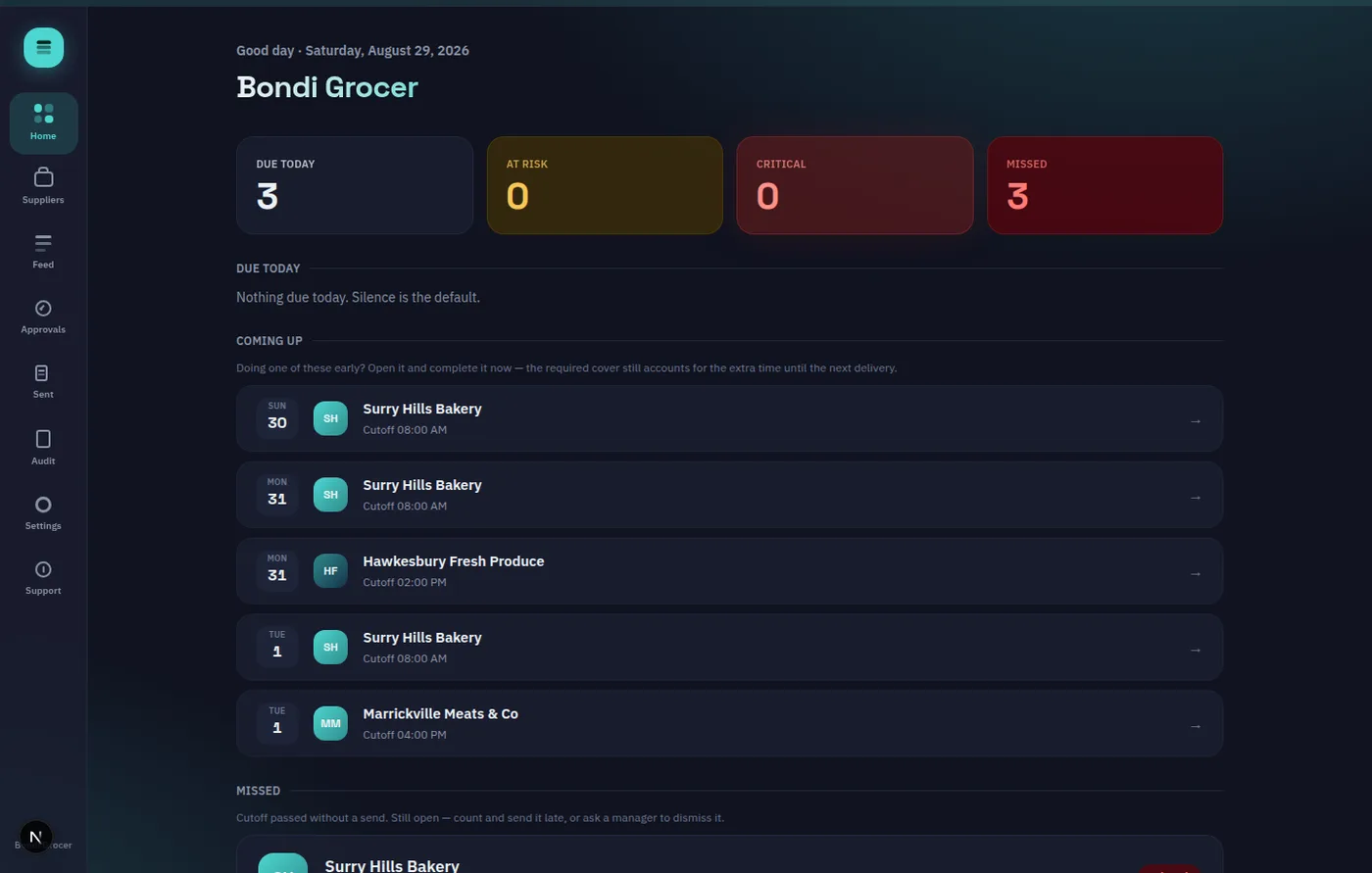
| | Spreadsheet | Mobile ordering app | |---|---|---| | Cutoff tracking | Manual, in someone's head | Per-supplier, timezone-aware, with due-today/at-risk/missed states | | Order quantity math | Hand-built formulas | Deterministic calculation from stock counts and sales history, always reviewable and editable before sending | | Manager sign-off | Ad hoc (email, verbal) | Optional PIN-based approval, turned on per supplier | | Decimal quantities (kg, litres) | Workable but fiddly | Native support for butcher/deli/produce lines | | Notifications | None | Silent by default — alerts only fire for at-risk, critical, or missed orders | | Multi-user, same order | Risky | Built for it |
OnHand is one concrete example of this category — a walk-around stocktake screen where a team member counts stock, the app suggests an order quantity from plain arithmetic (average daily sales × cover days, rounded to pack size), and a person reviews and can override that number before anything is sent. Nothing auto-sends. You can see the whole flow without signing up at the live product demo.
The honest caveat
If your store genuinely has one supplier, orders monthly, and one person handles it all, moving off a spreadsheet may not pay for itself yet — an ordering app is solving a coordination problem, and there's nothing to coordinate with one person and one supplier. The signal to watch for isn't a calendar date, it's a specific moment: the first time an order gets missed because the person who usually places it wasn't the one who noticed the deadline, or the first time two people's counts conflict in the same file. That's the actual threshold, not "spreadsheets are outdated."
How to evaluate the switch for yourself
Don't take a vendor's word for any of this, including ours. Count your actual suppliers and their real cutoff windows, count how many people touch ordering in a normal week, and compare that against what's above. If you want to see what the "encoded workflow" version looks like in practice rather than in a table, the no-signup product demo walks through a real stocktake and order-send with no account required, and the pricing and feature breakdown on the homepage lays out exactly what's free versus paid — including a genuinely free tier for a single supplier, no card required.